
Appearance
Import / Export
Otty can read configs from other terminals (Ghostty, Kitty, Alacritty) and write your current Otty config back out in any of those formats — useful when you're trying Otty alongside an existing setup, or when you want to share a configuration with someone who hasn't switched.
The same machinery is reachable two ways:
- Settings → Advanced → Config File has Import / Export rows with a source picker (Ghostty / Kitty / Alacritty).
- CLI:
otty import <source> [path]andotty export <source> [-o path].
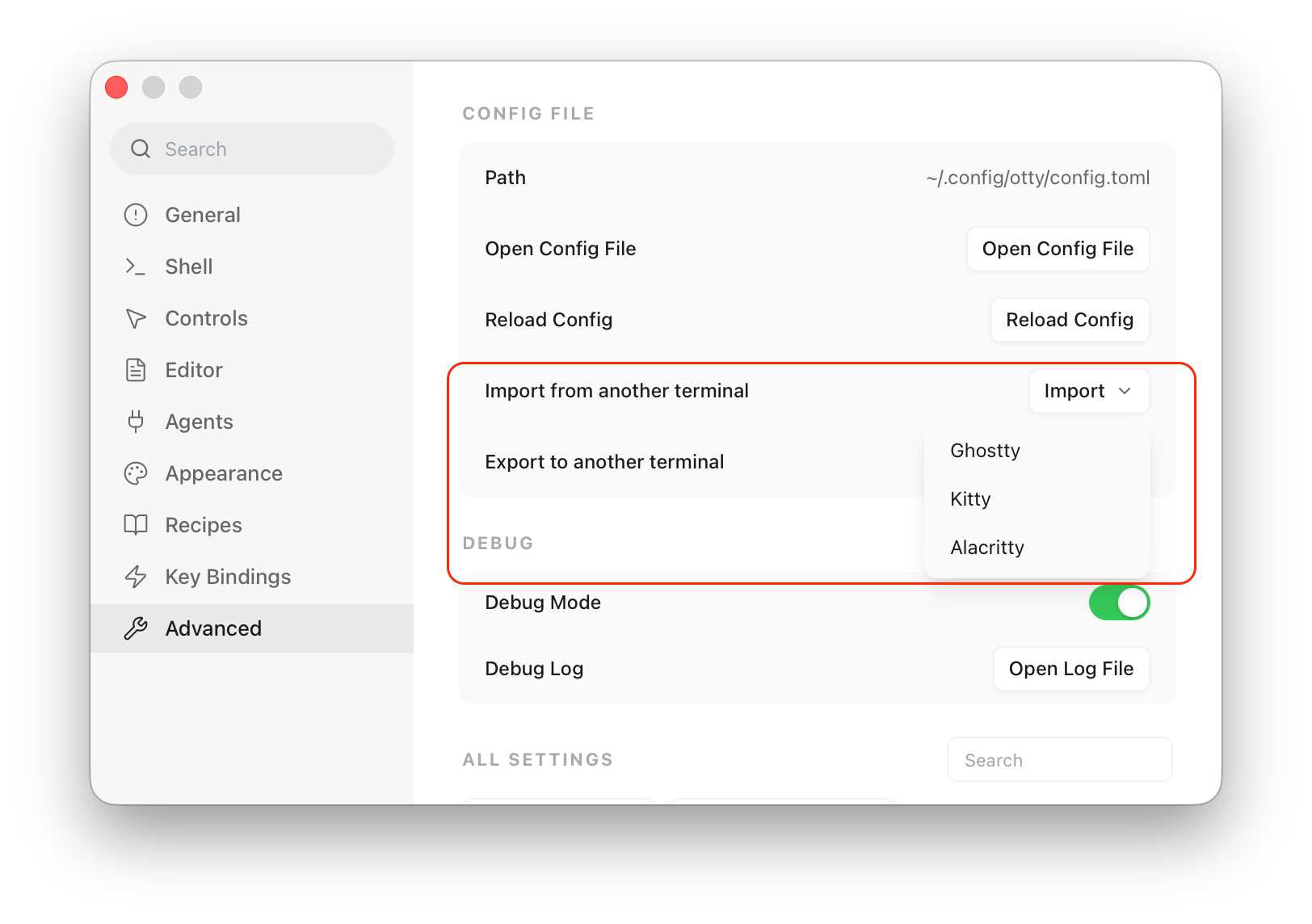
All conversions go through Otty's classification engine. Every line in the source file lands in one of four buckets:
| Bucket | What it means |
|---|---|
| Supported | Otty has the same key; the value is written as-is (or value-translated). |
| Conflict | Same key in Otty, but your current value is different. You decide per-row: keep current or overwrite. |
| Similar | Otty has a close analog (e.g. window-padding-x ≈ ui-padding). Not auto-imported — the dialog shows a note so you can decide manually. |
| Source-only | The source terminal has the concept, Otty does not. The dialog lists each key with a docs link so you can browse Otty's surface for an alternative. |
On the export side, every Otty key that the target terminal does not support is collected into a "dropped" list — same display treatment, with docs links to the Otty key.
Supported sources
Each terminal below has a per-key support table. It's collapsed by default — expand it to see exactly which keys import automatically, which map to a different Otty key, and which Otty settings have no counterpart in that terminal.
Ghostty
Default path: ~/.config/ghostty/config (with macOS Application Support fallback: ~/Library/Application Support/com.mitchellh.ghostty/config).
Both use a line-based key = value format, so a Ghostty config parses directly into Otty — but the two terminals don't share every key. Most of Ghostty's appearance and behavior keys map straight through; a handful translate to a different Otty key, and Otty's app-specific settings (agents, autocomplete, notifications, …) have no Ghostty equivalent.
Config key support — Ghostty · click to expand the full key list
Imported automatically — written straight into your Otty config (value-translated where noted). A ✓ means the key name and behavior are identical.
| Ghostty | Otty | Notes |
|---|---|---|
font-family | ✓ | |
font-family-bold | ✓ | |
font-family-italic | ✓ | |
font-family-bold-italic | ✓ | |
font-size | ✓ | |
font-thicken | ✓ | |
adjust-cell-height | ✓ | |
command | ✓ | |
env | ✓ | |
working-directory | ✓ | |
term | ✓ | |
scrollback-limit | ✓ | |
foreground | ✓ | |
background | ✓ | |
selection-foreground | ✓ | |
selection-background | ✓ | |
minimum-contrast | ✓ | |
cursor-style | ✓ | |
cursor-color | ✓ | |
cursor-text | ✓ | |
cursor-opacity | ✓ | |
mouse-hide-while-typing | ✓ | |
mouse-scroll-multiplier | ✓ | |
focus-follows-mouse | ✓ | |
macos-option-as-alt | ✓ | |
clipboard-read | ✓ | |
clipboard-write | ✓ | |
clipboard-trim-trailing-spaces | ✓ | |
copy-on-select | ✓ | |
clipboard-paste-protection | ✓ | |
theme | ✓ | |
background-opacity | ✓ | |
keybind | ✓ | |
kitty-keyboard | ✓ | |
palette | ✓ | |
link-previews | ✓ | |
unfocused-split-opacity | ✓ |
Similar — Otty has a close-but-not-identical knob, so these are shown as a note for you to apply manually (never auto-written).
| Ghostty | Otty (closest) | Notes |
|---|---|---|
mouse-shift-capture | mouse-shift-to-select | polarity flipped: ghostty true = capture forwarded → Otty false (no local select) |
window-padding-x | ui-padding | Otty unifies horizontal/vertical padding under the active theme's [container].padding |
window-padding-y | ui-padding | Otty unifies horizontal/vertical padding under the active theme's [container].padding |
window-padding-balance | ui-padding | Otty's padding is theme-driven; no per-axis balance knob |
window-decoration | auto-hide-tab-bar | Otty has no full chrome-off mode; closest is hiding the tab bar |
background-blur-radius | background-opacity | Otty uses material blur via theme [window].material (glass/vibrancy); no numeric radius |
link-url | link-open-with | Otty configures the URL handler choice, not regex match |
confirm-close-surface | confirm-close-tab | Otty's analog applies per tab, not per surface |
quit-after-last-window-closed-delay | quit-after-last-window-closed | Otty quits immediately when enabled; no grace period |
shell-integration | shell-integration | ghostty's value is an injection-mode enum (none / detect / zsh / bash / fish); Otty's is a simple on/off toggle — set it manually (none → off, any other value → on) |
shell-integration-features | shell-integration | Otty has no per-feature list (ghostty's cursor / sudo / title / ssh-*); its shell integration is a single on/off switch, with remote sessions covered by ssh-integration |
No Ghostty equivalent — Otty-only settings; dropped (with a docs link) when you export to Ghostty.
| Otty key | |
|---|---|
font-family-fallback | font-family-fallback-bold |
font-family-fallback-italic | font-family-fallback-bold-italic |
font-blending | font-smooth |
font-antialiased | text-bold |
text-italic | text-underline |
text-blink | font-ligatures |
ligatures | font-ligatures-alphabet |
arrow-box-drawing-join | live-resize-sigwinch-delay-ms |
shell | window-working-directory |
tab-working-directory | split-working-directory |
enquiry-response | osc-color-report-format |
title-report | vt-kam-allowed |
scrollback-lines | session-log-size-mb |
session-log-mode | session-restore-banner |
session-restore-multiplayer | session-restore-processes |
session-restore-process-allowlist | freeze-inactive-tab |
agent-command | |
window-size | window-width-px |
window-height-px | window-cols |
window-rows | bold-color |
faint-opacity | cursor-style-blink |
cursor-animation | mouse-reporting |
right-click-action | mouse-shift-to-select |
cursor-click-to-move | link-open-with |
file-open-with | folder-open-with |
link-schemes | link-scheme-allowlist |
scroll-to-bottom | clipboard-paste-bracketed-safe |
selection-clear-on-typing | selection-clear-on-copy |
theme-dark | auto-theme-dark-mode |
sidebar-visible | sidebar-width |
details-panel-width | window-layout |
auto-hide-tab-bar | auto-hide-tabs-panel |
shift-arrow-select | ssh-integration |
omit-otty-prefix | cli-allow-overwrite |
open-with-app | default-git-client |
progress-bar-commands | vt-keypad-app-allowed |
widen-ambiguous | login-greeting |
window-opacity | dock-icon-animate-progress |
dock-icon-error-badge | ui-panel-background |
ui-panel-surface | ui-panel-border |
ui-border-subtle | ui-text-primary |
ui-text-secondary | ui-text-tertiary |
ui-hover | ui-active |
ui-accent | ui-font-family |
ui-font-size | language |
on-launch | quit-after-last-window-closed |
confirm-close-tab | confirm-close-window |
new-tab-position | autocomplete-shortcut |
autocomplete-show-candidates | autocomplete-inline-suggestion |
autocomplete-on-device-learning | autocomplete-history-ignore |
autocomplete-description-language | privilege-sound-on-error |
privilege-sound-shell | privilege-notification-on-finish |
privilege-notification-on-error | privilege-notification-on-watch-finish |
privilege-notification-shell | notification-foreground |
privilege-badge-exit-status | privilege-badge-activity |
privilege-badge-agent-processing | privilege-badge-agent-task-complete |
privilege-badge-agent-awaiting-input | privilege-notify-agent-task-complete |
privilege-notify-agent-awaiting-input | privilege-caffeinate-agent-processing |
privilege-resume-agent-session | privilege-mouse-shell |
privilege-title-shell | privilege-clipboard-shell |
ipc-allow-send-keys | |
ipc-allow-sensitive-sessions | auto-secure-input |
secure-input-indication | quick-terminal-persist-session |
quick-terminal-cwd | recipe-replay-saved |
recipe-replay-file | open-quickly-folders-limit |
frecency-auto-record | zoxide-enabled |
zoxide-local-path | editor-line-wrap |
editor-tab-size | editor-visible-whitespace |
editor-show-line-numbers | editor-default-to-preview-readonly |
editor-scroll-past-end | terminal-scroll-past-end |
terminal-scroll-past-first-line | terminal-scroll-past-end-sticky |
terminal-scroll-smooth | selection-backspace-deletes |
terminal-scrollbar-hide-on-auto-scroll |
Kitty
Default path: ~/.config/kitty/kitty.conf.
Kitty uses key value (space-separated, no =) with _ in key names. The adapter converts each key mechanically — font_family → font-family — and value-translates where the two terminals disagree (e.g. cursor_shape beam → cursor-style = bar). Keybinds (map …) are reported as similar so you can review them.
Config key support — Kitty · click to expand the full key list
Imported automatically — written straight into your Otty config (value-translated where noted). A ✓ means the key name and behavior are identical.
| Kitty | Otty | Notes |
|---|---|---|
background_opacity | ✓ | |
focus_follows_mouse | ✓ | |
mouse_hide_wait | mouse-hide-while-typing | seconds value → boolean |
scrollback_lines | ✓ | |
cursor_shape | cursor-style | shape names differ (beam→bar) |
cursor | cursor-color | |
cursor_text_color | cursor-text | |
selection_foreground | ✓ | |
selection_background | ✓ | |
foreground | ✓ | |
background | ✓ | |
font_family | ✓ | |
bold_font | font-family-bold | |
italic_font | font-family-italic | |
bold_italic_font | font-family-bold-italic | |
font_size | ✓ | |
term | ✓ | |
shell | command | |
editor | command | |
copy_on_select | ✓ | |
strip_trailing_spaces | clipboard-trim-trailing-spaces | |
color0 … color15 | palette | → palette = N=#hex |
Similar — Otty has a close-but-not-identical knob, so these are shown as a note for you to apply manually (never auto-written).
| Kitty | Otty (closest) | Notes |
|---|---|---|
window_padding_width | ui-padding | Otty's padding is theme-driven ([container].padding); kitty's single number maps to all four sides |
active_tab_background | ui-active | Otty derives tab background from the active theme; closest knob is the chrome ui-active color |
inactive_tab_background | ui-panel-background | Same — chrome color, not per-tab |
tab_bar_edge | auto-hide-tab-bar | Otty toggles the tab bar's presence rather than its edge |
tab_bar_style | window-layout | Otty controls tab placement via window-layout (sidebar / top / bottom) |
hide_window_decorations | auto-hide-tab-bar | Otty has no full chrome-off mode; hiding the tab bar gets you the most chrome-free view |
scrollback_pager | session-log-mode | Otty has its own scrollback pager and session-log redaction; kitty's external pager has no direct equivalent |
shell_integration | shell-integration | kitty's value is a feature list (enabled / no-cursor / no-title / disabled); Otty's is a simple on/off toggle — set it manually (disabled → off, else on) |
background_blur | background-opacity | Otty uses theme-driven material blur; kitty's blur radius doesn't translate |
include | theme | Otty does not chase include directives. To bring in kitty themes, set theme = ... after import |
map | keybind | Kitty keybinds parsed individually — see the keybind rows in the supported list |
cursor_blink_interval | cursor-style-blink | Otty toggles cursor blink, no per-interval timing |
cursor_stop_blinking_after | cursor-style-blink | Same — boolean, not timeout |
inactive_text_alpha | unfocused-split-opacity | kitty fades only the text of unfocused splits; Otty fades the whole pane (text + background) |
No Kitty equivalent — Otty-only settings; dropped (with a docs link) when you export to Kitty.
| Otty key | |
|---|---|
font-family-fallback | font-family-fallback-bold |
font-family-fallback-italic | font-family-fallback-bold-italic |
font-blending | font-smooth |
font-antialiased | text-bold |
text-italic | text-underline |
text-blink | font-ligatures |
ligatures | font-ligatures-alphabet |
font-thicken | arrow-box-drawing-join |
live-resize-sigwinch-delay-ms | adjust-cell-height |
shell | env |
working-directory | window-working-directory |
tab-working-directory | split-working-directory |
enquiry-response | osc-color-report-format |
title-report | vt-kam-allowed |
scrollback-limit | session-log-size-mb |
session-log-mode | session-restore-banner |
session-restore-multiplayer | session-restore-processes |
session-restore-process-allowlist | freeze-inactive-tab |
agent-command | |
window-size | window-width-px |
window-height-px | window-cols |
window-rows | bold-color |
faint-opacity | minimum-contrast |
palette | cursor-style-blink |
cursor-opacity | cursor-animation |
mouse-reporting | mouse-scroll-multiplier |
macos-option-as-alt | right-click-action |
mouse-shift-to-select | cursor-click-to-move |
link-open-with | file-open-with |
folder-open-with | link-schemes |
link-scheme-allowlist | link-previews |
scroll-to-bottom | clipboard-read |
clipboard-write | clipboard-paste-protection |
clipboard-paste-bracketed-safe | selection-clear-on-typing |
selection-clear-on-copy | theme |
theme-dark | auto-theme-dark-mode |
sidebar-visible | sidebar-width |
details-panel-width | window-layout |
auto-hide-tab-bar | auto-hide-tabs-panel |
shift-arrow-select | ssh-integration |
omit-otty-prefix | cli-allow-overwrite |
open-with-app | default-git-client |
progress-bar-commands | kitty-keyboard |
vt-keypad-app-allowed | widen-ambiguous |
login-greeting | window-opacity |
dock-icon-animate-progress | dock-icon-error-badge |
ui-panel-background | ui-panel-surface |
ui-panel-border | ui-border-subtle |
ui-text-primary | ui-text-secondary |
ui-text-tertiary | ui-hover |
ui-active | ui-accent |
ui-font-family | ui-font-size |
language | on-launch |
quit-after-last-window-closed | confirm-close-tab |
confirm-close-window | new-tab-position |
autocomplete-shortcut | autocomplete-show-candidates |
autocomplete-inline-suggestion | autocomplete-on-device-learning |
autocomplete-history-ignore | autocomplete-description-language |
privilege-sound-on-error | privilege-sound-shell |
privilege-notification-on-finish | privilege-notification-on-error |
privilege-notification-on-watch-finish | privilege-notification-shell |
notification-foreground | privilege-badge-exit-status |
privilege-badge-activity | privilege-badge-agent-processing |
privilege-badge-agent-task-complete | privilege-badge-agent-awaiting-input |
privilege-notify-agent-task-complete | privilege-notify-agent-awaiting-input |
privilege-caffeinate-agent-processing | privilege-resume-agent-session |
privilege-mouse-shell | privilege-title-shell |
privilege-clipboard-shell | |
ipc-allow-send-keys | ipc-allow-sensitive-sessions |
auto-secure-input | secure-input-indication |
quick-terminal-persist-session | quick-terminal-cwd |
recipe-replay-saved | recipe-replay-file |
open-quickly-folders-limit | frecency-auto-record |
zoxide-enabled | zoxide-local-path |
editor-line-wrap | editor-tab-size |
editor-visible-whitespace | editor-show-line-numbers |
editor-default-to-preview-readonly | editor-scroll-past-end |
terminal-scroll-past-end | terminal-scroll-past-first-line |
terminal-scroll-past-end-sticky | terminal-scroll-smooth |
selection-backspace-deletes | terminal-scrollbar-hide-on-auto-scroll |
Alacritty
Default path: ~/.config/alacritty/alacritty.toml (TOML, not YAML — older Alacritty versions used YAML; those files are not parsed).
The TOML adapter flattens nested sections into dotted paths ([font.normal]family → font.normal.family) and walks the same translation tables. Color sections ([colors.normal] / [colors.bright]) lower into Otty's palette, and [[keyboard.bindings]] arrays are reported as similar.
Config key support — Alacritty · click to expand the full key list
Imported automatically — written straight into your Otty config (value-translated where noted). A ✓ means the key name and behavior are identical.
| Alacritty | Otty | Notes |
|---|---|---|
font.size | font-size | |
font.normal.family | font-family | |
font.bold.family | font-family-bold | |
font.italic.family | font-family-italic | |
font.bold_italic.family | font-family-bold-italic | |
window.opacity | background-opacity | |
window.startup_mode | window-size | Maximized→frame, Fullscreen→remember |
window.dynamic_title | title-report | |
scrolling.history | scrollback-lines | |
cursor.style.shape | cursor-style | shape names differ (Beam→bar) |
cursor.style.blinking | cursor-style-blink | |
cursor.thickness | cursor-opacity | approximate |
colors.primary.foreground | foreground | |
colors.primary.background | background | |
colors.selection.foreground | selection-foreground | |
colors.selection.background | selection-background | |
colors.cursor.cursor | cursor-color | |
colors.cursor.text | cursor-text | |
selection.save_to_clipboard | copy-on-select | |
mouse.hide_when_typing | mouse-hide-while-typing | |
env.TERM | term | |
terminal.shell.program | command | |
colors.normal.* / colors.bright.* | palette | 16 ANSI colors → palette = N=#hex |
Similar — Otty has a close-but-not-identical knob, so these are shown as a note for you to apply manually (never auto-written).
| Alacritty | Otty (closest) | Notes |
|---|---|---|
window.padding.x | ui-padding | Otty unifies padding under the active theme's [container].padding; no separate x/y |
window.padding.y | ui-padding | Otty unifies padding under the active theme's [container].padding; no separate x/y |
window.dimensions.columns | window-cols | Use window-size = grid for cell-based startup sizing in Otty |
window.dimensions.lines | window-rows | Use window-size = grid for cell-based startup sizing in Otty |
window.decorations | auto-hide-tab-bar | Otty has no full chrome-off mode; closest is hiding the tab bar |
font.builtin_box_drawing | arrow-box-drawing-join | Otty always renders box-drawing glyphs; closest analog is the arrow-join knob |
keyboard.bindings | keybind | Alacritty keybinds parsed individually; see the keybind entries |
hints.enabled | link-open-with | Alacritty hint mode and Otty's hint-mode have different surfaces; nearest knob is URL handler choice |
mouse.bindings | right-click-action | Otty's mouse-button bindings are scoped to right-click action |
No Alacritty equivalent — Otty-only settings; dropped (with a docs link) when you export to Alacritty.
| Otty key | |
|---|---|
font-family-fallback | font-family-fallback-bold |
font-family-fallback-italic | font-family-fallback-bold-italic |
font-blending | font-smooth |
font-antialiased | text-bold |
text-italic | text-underline |
text-blink | font-ligatures |
ligatures | font-ligatures-alphabet |
font-thicken | arrow-box-drawing-join |
live-resize-sigwinch-delay-ms | adjust-cell-height |
shell | env |
working-directory | window-working-directory |
tab-working-directory | split-working-directory |
enquiry-response | osc-color-report-format |
title-report | vt-kam-allowed |
scrollback-limit | session-log-size-mb |
session-log-mode | session-restore-banner |
session-restore-multiplayer | session-restore-processes |
session-restore-process-allowlist | freeze-inactive-tab |
agent-command | |
window-size | window-width-px |
window-height-px | window-cols |
window-rows | bold-color |
faint-opacity | minimum-contrast |
palette | cursor-opacity |
cursor-animation | mouse-reporting |
mouse-hide-while-typing | mouse-scroll-multiplier |
focus-follows-mouse | macos-option-as-alt |
right-click-action | mouse-shift-to-select |
cursor-click-to-move | link-open-with |
file-open-with | folder-open-with |
link-schemes | link-scheme-allowlist |
link-previews | scroll-to-bottom |
clipboard-read | clipboard-write |
clipboard-trim-trailing-spaces | copy-on-select |
clipboard-paste-protection | clipboard-paste-bracketed-safe |
selection-clear-on-typing | selection-clear-on-copy |
theme | theme-dark |
auto-theme-dark-mode | sidebar-visible |
sidebar-width | details-panel-width |
window-layout | auto-hide-tab-bar |
auto-hide-tabs-panel | shift-arrow-select |
shell-integration | ssh-integration |
omit-otty-prefix | cli-allow-overwrite |
open-with-app | default-git-client |
progress-bar-commands | kitty-keyboard |
vt-keypad-app-allowed | widen-ambiguous |
login-greeting | window-opacity |
dock-icon-animate-progress | dock-icon-error-badge |
ui-panel-background | ui-panel-surface |
ui-panel-border | ui-border-subtle |
ui-text-primary | ui-text-secondary |
ui-text-tertiary | ui-hover |
ui-active | ui-accent |
ui-font-family | ui-font-size |
language | on-launch |
quit-after-last-window-closed | confirm-close-tab |
confirm-close-window | new-tab-position |
autocomplete-shortcut | autocomplete-show-candidates |
autocomplete-inline-suggestion | autocomplete-on-device-learning |
autocomplete-history-ignore | autocomplete-description-language |
privilege-sound-on-error | privilege-sound-shell |
privilege-notification-on-finish | privilege-notification-on-error |
privilege-notification-on-watch-finish | privilege-notification-shell |
notification-foreground | privilege-badge-exit-status |
privilege-badge-activity | privilege-badge-agent-processing |
privilege-badge-agent-task-complete | privilege-badge-agent-awaiting-input |
privilege-notify-agent-task-complete | privilege-notify-agent-awaiting-input |
privilege-caffeinate-agent-processing | privilege-resume-agent-session |
privilege-mouse-shell | privilege-title-shell |
privilege-clipboard-shell | |
ipc-allow-send-keys | ipc-allow-sensitive-sessions |
auto-secure-input | secure-input-indication |
quick-terminal-persist-session | quick-terminal-cwd |
recipe-replay-saved | recipe-replay-file |
open-quickly-folders-limit | frecency-auto-record |
zoxide-enabled | zoxide-local-path |
editor-line-wrap | editor-tab-size |
editor-visible-whitespace | editor-show-line-numbers |
editor-default-to-preview-readonly | editor-scroll-past-end |
terminal-scroll-past-end | terminal-scroll-past-first-line |
terminal-scroll-past-end-sticky | terminal-scroll-smooth |
keybind | selection-backspace-deletes |
unfocused-split-opacity | terminal-scrollbar-hide-on-auto-scroll |
CLI usage
sh
# Preview what would change — no write happens.
otty import ghostty
otty import kitty
otty import alacritty ~/some/other/alacritty.toml

# Apply with explicit conflict resolution.
otty import ghostty --overwrite   # take ghostty's value on every conflict
otty import kitty --keep          # apply only non-conflicting keys

# JSON output — same report, pipeable.
otty --json import ghostty

# Export.
otty export ghostty > ghostty-config
otty export kitty -o ~/.config/kitty/kitty.conf
otty export alacritty -o ~/.config/alacritty/alacritty.toml
The exported file is a complete drop-in for the target terminal — your current Otty values fill every key the target supports, every other key goes into the dropped list (printed to stderr in text mode, returned in JSON otherwise).
GUI flow
- Open Settings → Advanced.
- Under Config File you'll see two rows:
- Import from another terminal —
[Source ▾] [Import...] - Export to another terminal —
[Source ▾] [Export...]
- Import from another terminal —
- Pick the source. The Import picker opens with the default path pre-selected; you can browse to another file before confirming.
- The summary dialog shows the four buckets above. Conflict rows have a per-row dropdown (Overwrite / Keep current) plus bulk "Overwrite all" and "Keep all" buttons. Tap Apply Import to write.
- Every key carries a docs link to its configuration reference so you can read what a setting does without leaving the dialog.
See also
- Config File — where Otty stores the imported keys.
- Configuration Reference — every key, type, and default.
- Themes — import color themes from other terminals.
- CLI Reference — the
otty import/otty exportsubcommands.