
Appearance
Frequent Folders
Otty remembers the folders you work in and ranks them by frecency — frequency + recency — so the place you want is usually one keystroke away. The same ranked list powers otty jump, Open Quickly's Folders tab, and folder suggestions in autocomplete.
It's the zoxide idea, built in: no extra binary, no shell plugin, and it stays in sync with the directories Otty already sees you visit.
Quick Start
Just use otty jump in Otty terminal.
sh
otty jump <folder-name>How folders get recorded
Three things feed the database:
Automatically, as you
cd. Every working-directory change an Otty pane reports is recorded. With Shell Integration on, that's a preciseOSC 7signal on each prompt; without it, Otty falls back to polling the foreground process's cwd. Controlled byfrecency-auto-record(on by default).Explicitly, with
otty learn. Record a folder on demand — handy for a directory you'll want later but haven'tcd'd into through Otty yet.bashotty learn # record the current directory otty learn ~/projects/api # record a specific folderImported from zoxide. Already have a zoxide history? Pull it in once:
bashotty import zoxide # merges zoxide's scores into Otty's databaseSee Import & Export.
Jumping with otty jump
otty jump <query> sends the focused pane to the highest-ranked directory whose path contains your query (case-insensitive substring). Matches on the folder's name outrank matches deeper in the path:
bash
otty jump api    # → the best-ranked folder with "api" in its path
otty jump        # no query → toggle between $HOME and your last jump
Ranking order for a query: an exact folder-name match wins, then a name that starts with the query, then a name that merely contains it, then a path-only match — ties broken by frecency score. Repeating the same query cycles past your current directory to the next-best match, so:
bash
jump typora      # → ~/work/Typora
jump typora      # → ~/work/Typora-i18n   (the next match)
Bare jump with no argument flips between $HOME and wherever you jumped from, like a "back" button.
Type jump, not otty jump
Turn on Settings → Shell → Omit otty prefix and jump becomes a shell function — it resolves the path and cds your shell locally, so nothing is echoed into the pane and your history stays clean. Map it shorter with a custom alias (cli-alias = j=jump). Both are covered in Using the CLI in your Shell.
Jumping from Open Quickly
Prefer the mouse-free picker? Press ⌘⇧O, then ⌘Z for the Folders filter — the same frecency list, fuzzy-searchable. Hit ↩ to change directory in the focused pane, or ⌘K for more:
| Action | What it does |
|---|---|
| Open in New Window · Split Right / Down | Open the folder elsewhere |
| Change Directory Here | cd the focused pane |
| Reveal · Copy Path | Finder / clipboard |
| Forget This Folder | Drop it from the rankings (same as otty ignore) |
See Open Quickly. The open-quickly-folders-limit setting caps how many folders the picker shows.
Curating the list
From GUI
Everything lives under Settings → Shell → Frequent Folders:
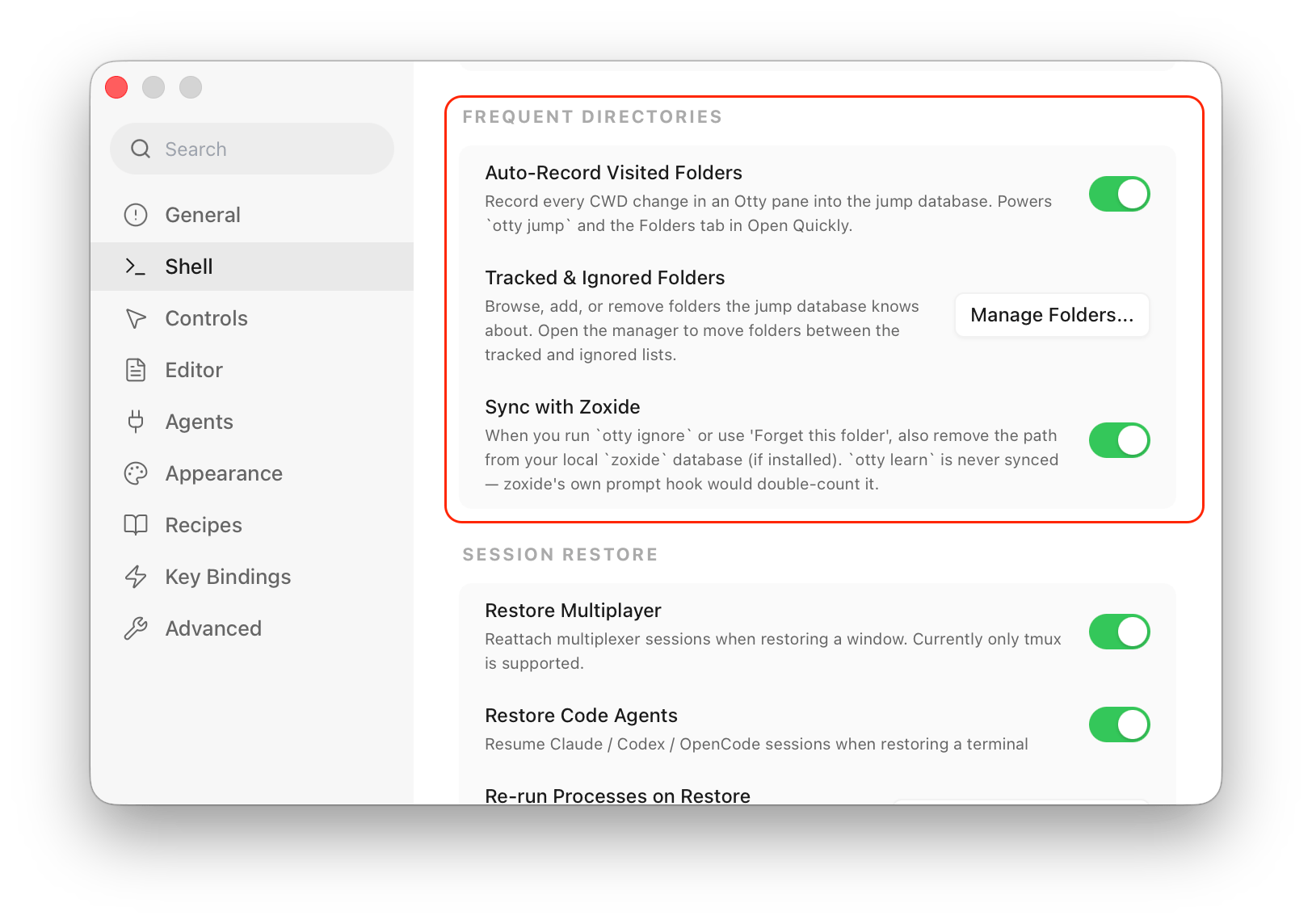
Click Manage Folders… to open the Manage Jump Folders editor — the full view of the database:
- Switch between the Tracked and Ignored lists with the segmented control at the top; each row shows the folder and its current Score.
- Add… a folder by hand (handy before you've ever
cd'd into it), Remove the selected rows, or Clear All to start over. - Ignore sends a tracked folder to the black-list so it stops showing up in jump results; Unignore brings an ignored one back.
For a one-off you don't need the editor: in Open Quickly's Folders tab, press ⌘K on a result and choose Forget this folder — the GUI equivalent of otty ignore.
From CLI
The jump: subcommands are the command-line mirror of the Manage Folders editor:
bash
otty jump:add ~/projects/api # record a folder (same as otty learn <folder>)
otty jump:remove ~/tmp/build # delete a folder from the database
otty jump:view api           # what does "api" resolve to, and at what score?
otty jump:ls                 # the top 100 folders, ranked by score
otty jump:import             # merge your zoxide history in
jump:remove deletes an entry now, but doesn't stop it — cd-ing back into the folder records it again.
A directory you never want suggested — a scratch dir, a temp checkout — should be black-listed instead:
bash
otty ignore ~/tmp/scratch # remove it, and stop it coming back when you cd inIgnoring is sticky: cd-ing back into an ignored folder won't resurrect it. If the external zoxide binary is present, otty ignore also runs zoxide remove <path> so the two stay in agreement (toggle with zoxide-enabled). The Forget This Folder action in Open Quickly does the same thing.
How the ranking works
Each visit adds 1 to a folder's raw score. At read time that score is scaled by how recently you were last there:
| Last visited | Weight |
|---|---|
| < 1 hour | ×4 |
| < 1 day | ×2 |
| < 1 week | ×0.5 |
| older | ×0.25 |
So a folder you opened ten times last month can still sit below one you've touched twice today — recency wins, which is the whole point of frecency. Otty keeps the top 100 folders by this decayed score and quietly trims the rest, so the list never grows stale or unbounded.
Other options
Two switches in the same Settings → Shell → Frequent Folders panel tune how the database behaves:
| Setting | Config key | Default | What it does |
|---|---|---|---|
| Auto-Record Visited Folders | frecency-auto-record | on | Record every cd in an Otty pane into the jump database. Turn it off to stop auto-learning and curate the list by hand (otty learn / the Manage Folders editor) only. |
| Sync with Zoxide | zoxide-enabled | on | When you otty ignore a path — or pick Forget this folder — also run zoxide remove on your local zoxide database, if one is installed, so the two stay in agreement. otty learn is never synced (zoxide's own prompt hook would double-count it). |
The picker has one more knob: open-quickly-folders-limit (default 12) caps how many folders the Open Quickly Folders tab shows at once.
See also
- Using the CLI in your Shell —
jump,learn,ignore, and aliases. - Open Quickly — the picker and its Folders filter.
- Shell Integration — the
OSC 7reporting that auto-records folders. - Import & Export — bringing your zoxide history in.