
Appearance
Setup
Otty doesn't run agents for you — you keep using Claude Code, Codex, OpenCode or any of the other agents it supports exactly as you do today. The one-time setup here teaches each agent to report its state back to Otty, so the window can show live badges, fire notifications, resume sessions, and surface history. It's a single click per agent.
Install Code Agent Integration
Open Settings (⌘,) and select the Agents tab in the sidebar.
Each agent is one row, with the path Otty found its CLI at underneath — or Not installed when it isn't on this machine. For every agent you actually use, turn its switch on: the row then reads a green Installed. The > at the end of a row opens its details, including what the switch wrote.
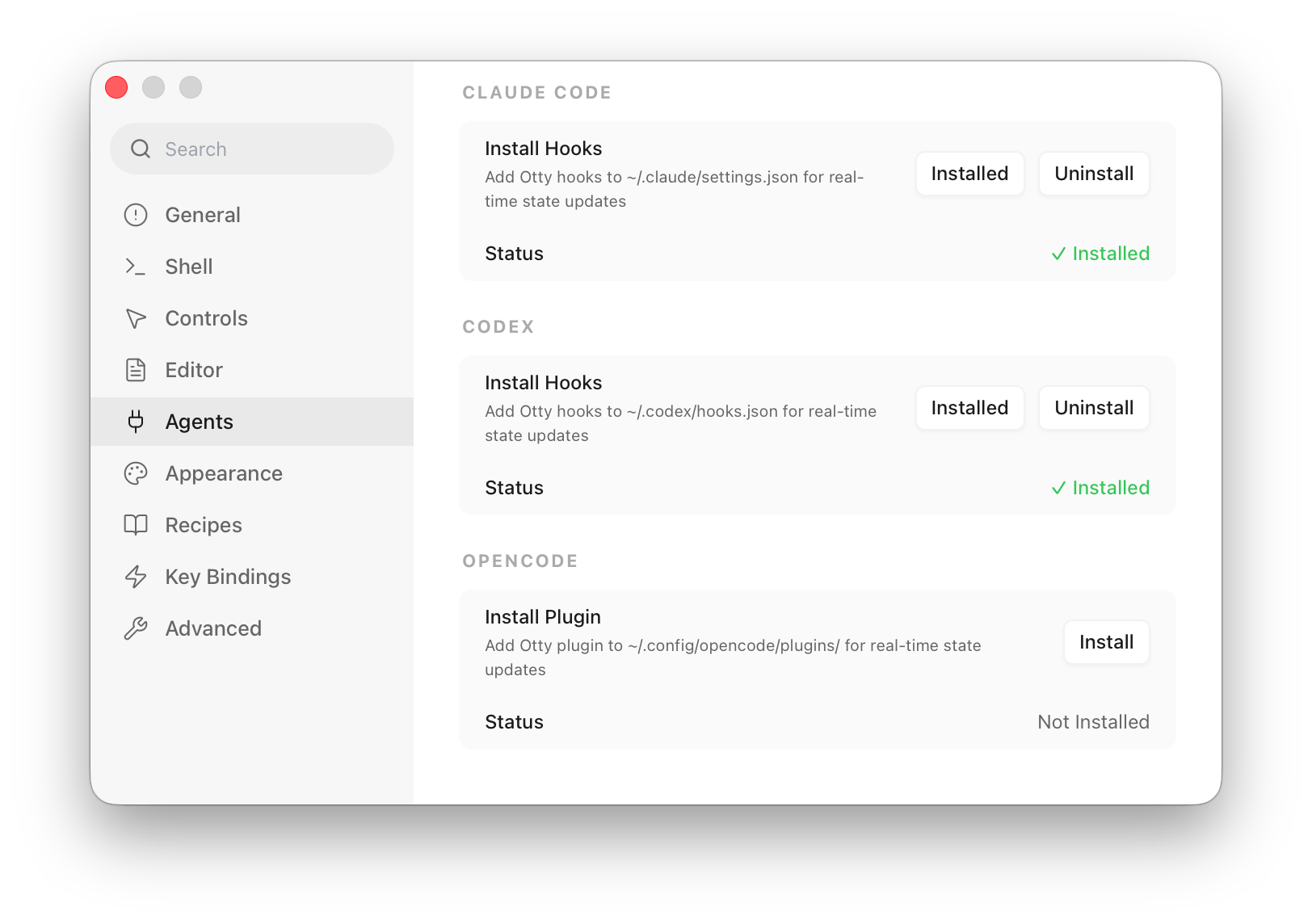
What the switch writes — and nothing else in those files is touched:
| Agent | Writes to |
|---|---|
| Claude Code | ~/.claude/settings.json |
| Codex | ~/.codex/hooks.json |
| OpenCode | ~/.config/opencode/plugins/ |
Supported Agents has the same column for every agent on the list.
Restart the agent once
The integration connects only after the agent starts with the new config. If an agent was already running in a tab, restart it. For OpenCode, send one message so the plugin reports the session. For Codex, if you recently updated Otty or Codex, approve the trust prompt when it restarts.
Turn the switch back off at any time — it cleanly removes Otty's entries and leaves the rest of the file untouched.
What the integration does
Once at least one agent's hooks are installed, the Agent Behavior section at the top of the Agents tab comes alive. (The toggles are greyed out until then — there's nothing for them to act on.)
| Setting | Default | What it does |
|---|---|---|
| Badge While Processing | On | Marks the tab while the agent is working on a task. |
| Badge When Task Completes | On | Marks the tab when the agent finishes. |
| Badge When Awaiting Input | On | Marks the tab when the agent is waiting for approval or input. |
| Notify When Task Completes | On | Sends a system notification on completion. |
| Notify When Awaiting Input | On | Sends a system notification when the agent needs you. |
| Prevent Sleep While Processing | Off | Keeps macOS awake while a task is running — see Keeping the Mac awake. |
| Resume Session on Recovery | On | Reopens the agent session when a recovered terminal comes back. |
Keeping the Mac awake
Prevent Sleep While Processing holds macOS awake while an agent is working on something. A MacBook with the lid shut sleeps anyway, though — whatever an app asks for, plugged in exactly as on battery. Overriding that needs a system-wide setting only root can write, so the lid half sits behind the disclosure on that row as Also When the Lid Is Closed, off by default.
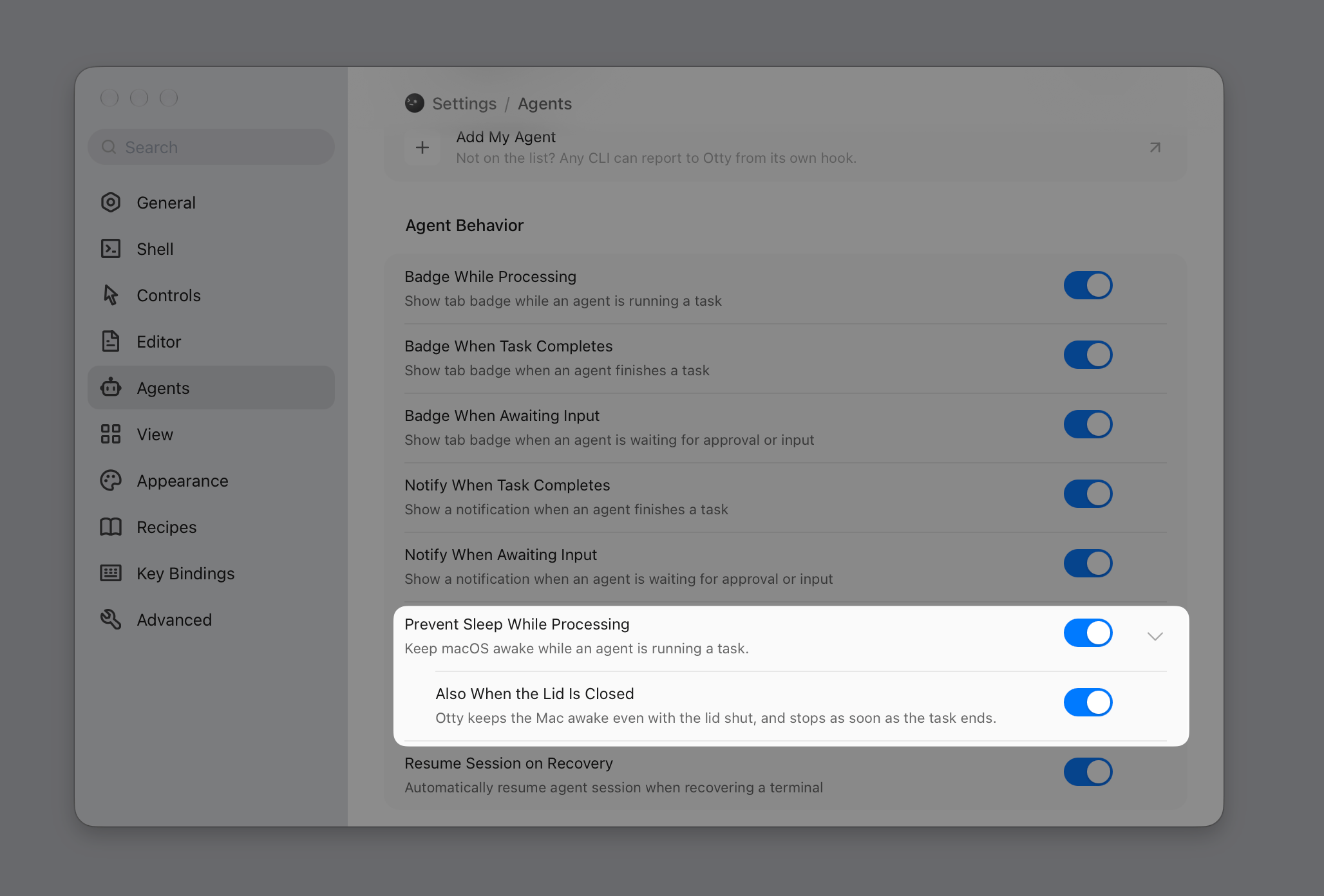
Switching it on the first time installs a small background helper that macOS asks you to approve: System Settings → General → Login Items & Extensions → App Background Activity, where you turn Otty on. The row says so while it is waiting. Otty has to be in your Applications folder — macOS will not install a background helper for an app running from anywhere else.
The hold lasts exactly as long as the task, and it is tied to Otty's live connection to the helper rather than to anything written on disk. Quitting Otty, force-quitting it, or a crash all hand normal sleep straight back; there is no state where the app is gone and the Mac stays awake anyway. Turning the switch off later leaves the helper in place, so turning it back on needs no second approval.
These state signals are what power the rest of the agent experience: the tab badges and dashboard in Monitor Tasks, the live transcript and Resume in History, and the branch / fork actions for spinning a new task off an existing context.
Usage readout
Open the details panel (⌘I) on the Info tab while an agent is running and its group shows what the session has spent: how much of the context window it is using and its running token total. There is nothing to turn on — the numbers are read straight out of the log that agent already writes, so it costs a file read and nothing leaves your machine.
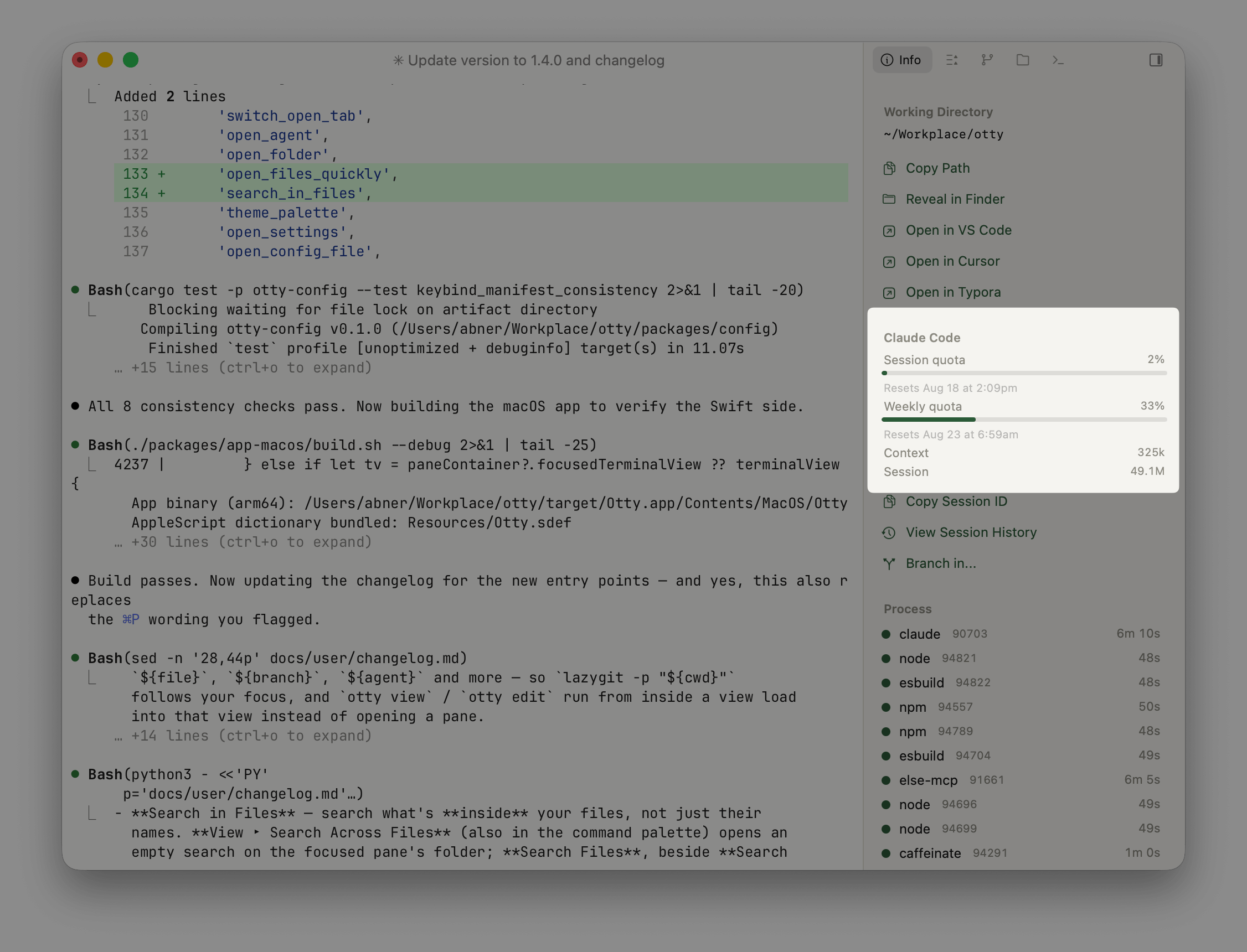
What each agent reports differs, because each one records something different:
| Agent | Plan quota | Context | Tokens | Cost |
|---|---|---|---|---|
| Claude Code | On by default | Yes | Yes | — |
| Codex | On by default | Yes | Yes | — |
| omp | On by default | Yes | Yes | Yes |
| OpenCode | — | Yes | Yes | Yes |
| pi | — | Yes | Yes | Yes |
| Kimi Code | — | Yes | Yes | — |
| Cursor CLI, Grok Build, Reasonix | — | — | — | — |
Bars need a real ceiling. Codex is the one agent that states one: its context window goes into its own session log, and its plan window comes back from the server, so both of its readings get a bar — amber past 75%, red past 90%, warning before a limit bites rather than reporting it after. Every other agent would need that ceiling guessed from a model id, so they show the measured occupancy on its own. Claude in particular records nothing that distinguishes a 200k session from a 1M one.
Codex's quota is asked for, not overheard. It used to be read out of the rate_limits block in its session log, which was free but frozen at whatever that session's last request saw — a few idle days here and the panel showed days-old figures, and spend from another machine never appeared at all. It now asks codex app-server, which answers from the server.
Plan quota is reported by three agents — Claude Code, Codex and omp — and all three show it out of the box. To switch one off, expand its row under Settings (⌘,) → Agents and turn off Show Plan Quota; the setting records the agents you turned off, so an agent that learns to report a quota in a later version arrives switched on rather than silently dark.
- Claude Code shows Session quota and Weekly quota bars, each with its reset time underneath — the same two numbers
/usageshows you inside Claude Code. It comes fromclaude -p "/usage". - Codex shows its plan's window plus any per-model allowance as separate bars, since they are separate budgets. It asks
codex app-serverdirectly, so the figures are live and include usage from your other machines. - omp gains its 5-hour, weekly and monthly spend limits, from
omp usage --json. Every account you have signed in is pooled into one bar, the way omp's own capacity line counts them — rotating between accounts is the point, so a single account's ceiling would understate what you have. The figures cover spend omp itself brokered; anything you spent through another client is invisible to it, which is what the As observed by omp line means.
These have a switch at all because they are the only readings that cost anything: each runs that agent's CLI in the background — the same command you'd type yourself — which takes a couple of seconds rather than a file read. If the CLI isn't installed, Otty stops trying after a few failed attempts rather than retrying forever.
The other agents report no limits at all, so there is no switch on their rows.
It re-reads every 5 minutes, and again whenever a task finishes, since that is when the numbers actually moved. Several agents finishing at once still costs one reading. Claude's probe runs on the cheapest model, at low effort, and with session persistence off, so it neither shows up in your session history nor costs anything meaningful. Every one of them uses the login that CLI already has: no sign-in, no stored password, and nothing read from your Keychain.
The toggle is also in the command palette and the workspace agent menu as Show Plan Quota.
Cost is only ever the agent's own number. OpenCode, pi, and omp compute what a session spent and write it down, so that figure is shown as-is. The others log tokens but no cost, and pricing those tokens against a public rate card would produce an API-equivalent number that no subscription is actually billed at — so nothing is shown rather than something misleading.
Skills
At the bottom of the Agents tab, the Skills card hands your coding agent a few ready-made abilities that drive Otty from inside a session:
| Skill | What the agent can then do |
|---|---|
| /wait | Block until something finishes — a command, another agent's session, or a pane / tab / window going idle. |
| /tell | Send a message to another terminal: an agent session, a window, a tab, or the active pane. |
| /open | Open a file or URL inside Otty — in a split, a new tab, or a new window. |
Click Copy on a row, then paste into your agent — it writes the skill file itself. See Skills for what to type afterwards, and for the permission /tell needs before it can type into a pane.
See also
- Composer — the input affordance for agent sessions.
- History — search and resume past sessions.
- Monitor Tasks — running multiple agents at once.