
Appearance
Progress State
Otty surfaces the live state of long-running commands and tasks visually — a spinner or badge on the tab, an animated Dock icon, and (on supported platforms) a taskbar-style progress bar. The state is driven by the ConEmu OSC 9;4 progress protocol, with three ways to feed it:
- Programs emit
OSC 9;4themselves (curl, package managers, and anything ConEmu/Windows-Terminal-aware already do). - Shell integration auto-emits it for a configurable list of commands — no program changes needed.
otty watchwraps any command so it gets a spinner-to-finish badge.
For system notifications (banners, sounds, Dock bounce) that fire when a task ends, see Privilege and Notifications.
How a program reports progress (OSC 9;4)
The ConEmu OSC 9;4 sequence reports a task state. One printf updates the indicator:
bash
printf '\e]9;4;1;40\a'   # determinate — 40 %
printf '\e]9;4;3\a'      # indeterminate — spinner (percentage unknown)
printf '\e]9;4;2;80\a'   # error — held at 80 %
printf '\e]9;4;0\a' # clear — remove the indicator| State | Sequence | Meaning |
|---|---|---|
0 | OSC 9;4;0 | Clear / no progress |
1 | OSC 9;4;1;<pct> | In progress — <pct> is 0–100 |
2 | OSC 9;4;2[;<pct>] | Error — optionally hold at a percentage |
3 | OSC 9;4;3 | Indeterminate — spinner, percentage unknown |
4 | OSC 9;4;4[;<pct>] | Paused / warning — ignored by Otty (no special reaction). |
5 | OSC 9;4;5;<exit>[;watch] | Otty extension — finished with exit code <exit>. The trailing watch tag marks a finish from otty watch so it can route to its own notification toggle. |
Otty maps these to the tab badge and Dock icon (below). Other terminals route them to their OS taskbar; see the Terminal Comparison for who supports what. These ride on the same OSC number as the OSC 9 desktop notification but are a distinct sub-protocol (the leading 4) — see OSC 9;4 for the sequence reference.
Try it
otty features try progress fires a determinate bar; otty features try error-state fires the error variant.
Automatic progress for known commands
You rarely need to emit OSC 9;4 by hand. When shell integration is on, Otty auto-wraps a built-in list of slow commands so they show an indeterminate spinner while running and a finish/error badge on exit.
The list ships with common offenders — curl, wget, rsync, scp, git fetch/pull/push/clone, brew install/update/upgrade, npm/pnpm/yarn/bun install, pip install, cargo build/install/update, docker pull/push/build, apt/apt-get install/update/upgrade, and more.
Edit it under Settings → Advanced → Auto Progress-Bar Commands. Each entry is matched as a whitespace-delimited prefix, so git push matches git push origin main but not git status. Clear the field to disable auto-progress entirely.
otty watch — wrap any command
For a one-off command that doesn't emit progress itself, prefix it with otty watch:
bash
otty watch make deploy
otty watch -q cargo test     # -q / --quiet: no system notification on finish
otty watch shows an indeterminate spinner while the command runs, then a success or error badge when it exits — and posts a Notify on Watch Finish notification (unless -q). Because it tags its finish with watch, you can keep watch notifications on while turning off the noisier per-command finish notifications. See the CLI Reference.
Tab badges
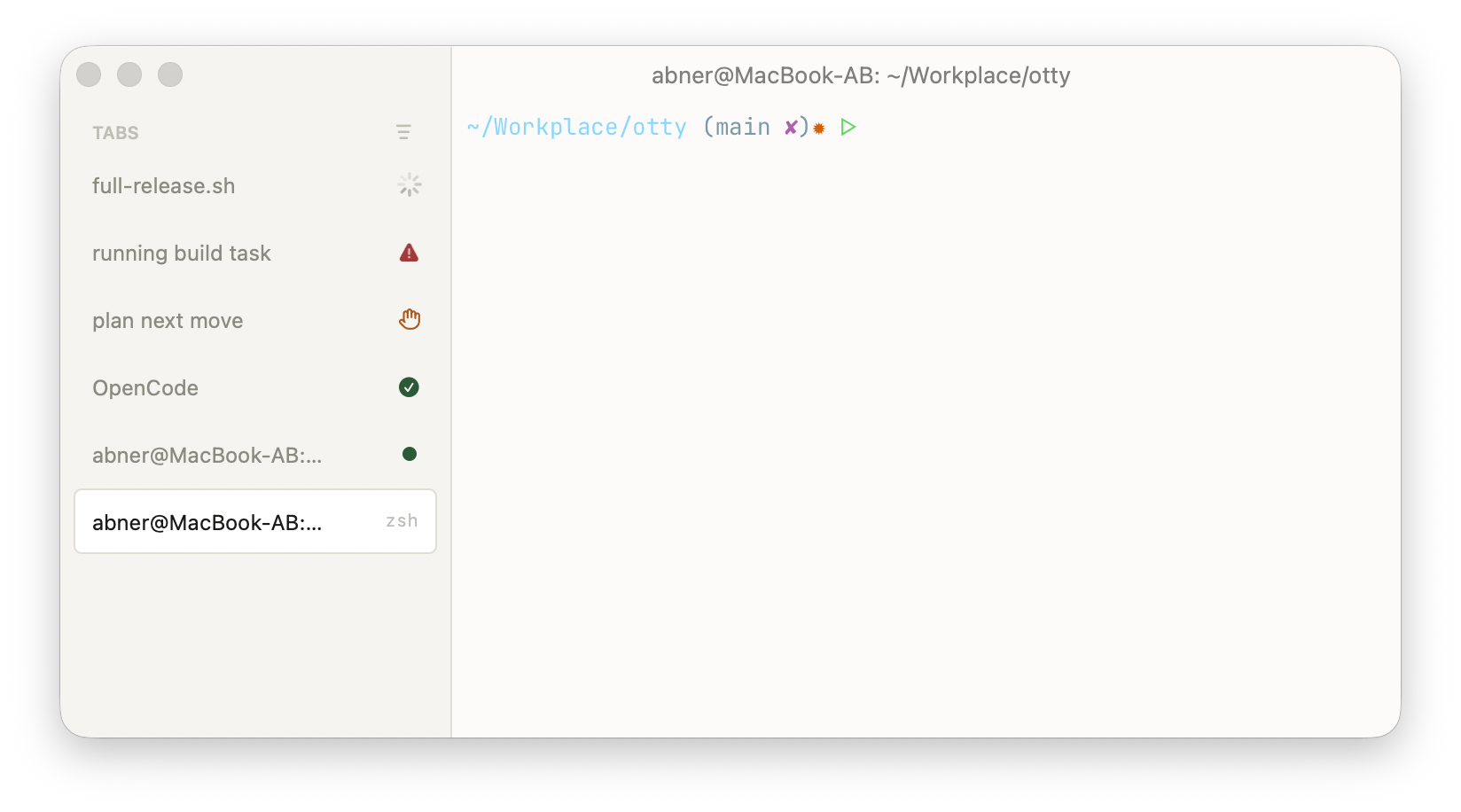
The progress state (and a few system conditions) drive a small badge on the tab:
| Badge | Shown when |
|---|---|
| Running — spinner | OSC 9;4;1/3 in progress, or otty watch running |
| Completed — checkmark | brief success flash, then settles to Finished |
| Finished — accent dot | command exited 0 (unread-output marker) |
| Error — alert triangle | command exited non-zero, or OSC 9;4;2 |
| Awaiting input — hand | a code agent is waiting on you, or a plain command stopped at an interactive prompt |
| Caffeinate / Sudo | a sleep-blocking or privileged session is active (set automatically) |
The command-driven badges need shell integration (they key off the OSC 133;D exit mark). Three toggles under Settings → Shell control them, all on by default:
- Tab Badge — When Command Finishes — accent dot after a successful command.
- Tab Badge — When Command Fails — alert badge after a non-zero exit.
- Tab Badge — When Command Awaits Input — hand badge when a running command stops at a
[y/n]confirmation, a password read, or a Press ENTER to continue pause (apt, pip, ssh, installers…). Detection waits until the prompt has been sitting at the cursor for about 1.5 s, so text merely scrolling past can't trigger it; typing into the pane clears it.
Scripts can set a badge directly over the CLI:
bash
otty tab badge --kind running        # running | completed | finished | unread | error | awaiting-input
otty tab badge --clear
(The system-derived caffeinate / sudo badges are intentionally not settable from the CLI.)
Dock icon
The app icon reflects aggregate progress across all tabs (Settings → Appearance):
- Animate Icon on Progress (off by default) — rotates the icon's eye while any session is working (
OSC 9;4progress/indeterminate). - Red Icon on Error (on by default) — tints the icon red when any session reports a non-zero exit or
OSC 9;4;2. Clicking the Dock icon jumps to the next failing tab and clears the tint.
Watching code-agent tasks
Coding agents (Claude Code, Codex, OpenCode) report their own state over IPC — processing, idle, awaiting input — which drive agent-specific badges (these do not require shell integration). Under Settings → Shell:
- Claude Code — While Processing (off by default) — spinner while the agent is thinking.
- Claude Code — When Task Completes (on by default) — dot when the agent goes idle.
- Claude Code — When Awaiting Input (on by default) — indicator when the agent needs approval or input.
To block a script until an agent finishes — e.g. one agent waiting on another before touching shared files — use otty watch:<agent>:
bash
otty watch:claude 9f3c1a2b              # blocks until that Claude session is idle
otty watch:codex   <id> --timeout-secs 600
otty watch:opencode <id> --interval-ms 2000 -v
It exits 0 when the session reaches idle (or has since closed), 4 if the session never reported a usable state (see --unknown-timeout-secs), 6 if the agent has no integration installed — it could never report, so waiting is pointless — and 9 on timeout. Note that hooks are read at session start: after installing the integration, restart the agent session before watching it. See Monitor Tasks for orchestration patterns.
See also
- Privilege and Notifications — banners, sounds, and the Dock bounce that fire when a task ends.
- Shell Integration — the
OSC 133marks behind command-driven badges and auto-progress. - Working with Agents and Monitor Tasks — agent state and
otty watch:<agent>. - Status Bar and Window, Tab and Split — where badges appear.
- OSC 9;4 and the Terminal Comparison — the progress protocol across terminals.
- Configuration Reference —
progress-bar-commands,dock-icon-animate-progress,dock-icon-error-badge,privilege-badge-*. - CLI Reference —
otty watch,otty watch:<agent>,otty tab badge.